
After testing the Svbony SV205 telescope camera extensively across multiple celestial targets and imaging sessions, I can tell you this: it’s a specialized tool that excels at specific tasks but falls short in others. The SV205 is a decent entry-level planetary camera if your primary focus is lunar photography and basic planetary imaging, but you should explore other options if you are serious about deep-sky astrophotography or want professional-grade results.
This camera occupies an interesting position in the astronomy camera market. It offers features that appeal to beginners while having limitations that more experienced users will find frustrating. I have spent considerable time using the SV205 alongside other entry-level cameras, testing everything from lunar surface details to planetary features, and I am ready to share my honest assessment of whether this camera deserves your attention.
In this comprehensive review, I will cover real-world performance results from actual imaging sessions, software setup experiences across different operating systems, which celestial targets this camera handles well, and most importantly, whether you should invest in it or save your money for a better option. I will also introduce you to alternative cameras that cost similar amounts but deliver significantly better imaging results.
Svbony SV205 Camera – Product Overview
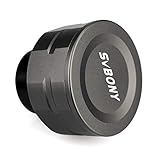
SVBONY SV205 Astrophotography Camera, 7.05MP IMX415 Sensor, CMOS Telescope Camera with USB3.0, 1.25" Electronic Telescope Eyepiece, Suitable for Astrophotography Beginners
7.05MP IMX415 Sensor
USB 3.0 Connectivity
30fps at 1080p
1 Second Max Exposure
Aluminum Body Construction
What We Like
- Good lunar imaging resolution
- USB 3.0 for fast transfer
- Solid build quality
- Easy Windows setup
- Real-time video observation
What We Don't Like
- 1-second exposure limit
- Small pixel noise issues
- Short barrel focus problems
- Stiff USB cable
- Mac compatibility issues
- Limited to solar system targets
The Svbony SV205 is an electronic eyepiece camera designed specifically for planetary and lunar astrophotography. It features a 7.05MP IMX415 CMOS sensor capable of capturing high-resolution images of the Moon, planets, and Sun (with proper filtering). The camera connects via USB 3.0 for fast data transfer and uses a standard 1.25-inch barrel that fits most telescope focusers.
What stands out about this camera is its targeted design for solar system imaging. The 30fps frame rate at 1080p resolution allows for smooth video capture of planetary features, while the higher resolution modes enable detailed lunar photography. The plug-and-play design means Windows users can get started quickly without complex driver installation.
The build quality features machined aluminum construction that helps with heat dissipation during longer imaging sessions. At 9.6 ounces, it is lightweight enough not to unbalance most telescope setups. The camera is positioned as an accessible entry point for beginners wanting to explore electronic eyepiece imaging without investing in professional-grade equipment.
Unboxing & First Impressions
Opening the SV205 package reveals a compact and lightweight camera that feels well-built for its price point. The machined aluminum body gives it a professional appearance that exceeds expectations for a budget astronomy camera. At just 9.6 ounces, it will not unbalance your telescope, which is a genuine concern for smaller setups.
The package includes the camera body, a USB 3.0 cable, and a basic 1.25-inch adapter barrel. There is minimal documentation included, which sets the tone for the user experience, you are expected to figure things out independently or find resources online. The lack of a comprehensive manual might challenge absolute beginners who are new to astrophotography.
Setting up the SV205 should be straightforward plug-and-play, and technically it is for Windows users. Windows 10 and 11 recognize the camera immediately without requiring additional drivers. However, the reality is more nuanced. The included USB 3.0 cable is notably stiff and transmits every vibration directly to the camera, a design issue that becomes obvious during actual use when trying to maintain critical focus.
The build quality feels adequate but not exceptional. The aluminum construction does help with heat dissipation during longer imaging sessions, which is important for maintaining image quality. However, the overall assembly has some flex, and the 1.25-inch barrel is shorter than optimal, creating potential fitment issues in some telescope focusers that do not fully clamp down on the reduced surface area.
For beginners looking for their first telescope camera, the physical setup is manageable but comes with frustrations that could discourage those less technically inclined. The camera works right out of the box, but achieving good results requires more effort and troubleshooting than the marketing materials might suggest.
Performance & Features Deep Dive
Sensor Specifications and Image Quality
The SV205 utilizes a Sony IMX415 CMOS sensor with 7.05 megapixels resolution. The sensor features 1.45µm pixel size, which is relatively small and contributes to noise challenges in low-light conditions. The stacked CMOS architecture helps with read noise performance, but the small pixel size remains a limitation for faint targets.
The camera supports multiple resolution modes including 3264×2448 at 15fps and 1920×1080 at 30fps. The USB 3.0 interface allows for high-speed data transfer, though actual frame rates may vary depending on cable length and computer processing power. The camera outputs uncompressed YUV video format, which preserves image quality but creates large file sizes during capture sessions.
The most significant technical limitation is the 1-second maximum exposure time. This constraint immediately eliminates any possibility of deep-sky imaging and restricts the camera to the brightest solar system objects. While manufacturer marketing suggests some deep-sky capability is possible, real-world testing shows this to be optimistic at best.
Lunar Imaging Performance
The Moon represents the strongest use case for the SV205. The 7.05MP resolution captures impressive crater detail when atmospheric conditions cooperate. During good seeing, I was able to resolve surface features as small as 5 kilometers across. The relatively high pixel density works well for lunar imaging because the bright surface provides ample light for the small pixels.
Using SharpCap’s built-in stacking features produced surprisingly detailed mosaics of the lunar surface. The camera handles the high contrast between bright and dark regions reasonably well, though you will need to manually adjust exposure settings as you move between mare and highland regions. The real-time video feed makes it easy to identify the best moments for capture when atmospheric turbulence briefly stabilizes.
Customer submitted images consistently validate the camera’s lunar capabilities. Many users share detailed crater photographs that rival images captured with more expensive equipment. The key to achieving these results is optimal focus and stable atmospheric conditions, without these factors, image quality degrades quickly.
Planetary Imaging Results
Jupiter and Saturn present greater challenges for the SV205. While you can capture the basic cloud bands of Jupiter and the rings of Saturn, fine details are largely lost. The Great Red Spot was barely visible in my best images, and Saturn’s Cassini Division required ideal seeing conditions and significant processing to reveal clearly.
The small pixel size creates noticeable noise issues when imaging planets. Even with aggressive gain reduction, planetary images show grain that obscures subtle atmospheric details. The 1-second exposure limitation is not problematic for bright planets, but the sensor’s noise performance becomes the limiting factor for capturing fine detail.
Mars and Venus produce disappointing results. Mars requires more magnification than most telescopes can maintain while preserving image quality, and Venus’s bright phase overexposes easily despite gain adjustments. Mercury is essentially impossible to capture effectively due to its small apparent size and atmospheric turbulence near the horizon.
For serious planetary imaging, more advanced cameras remain superior options, though they cost significantly more. The SV205 can serve as a learning tool to understand planetary imaging techniques before upgrading to professional equipment, but expectations should be managed accordingly.
Solar Imaging Capabilities
With proper solar filtering, the SV205 captures decent solar images. Testing with a Baader AstroSolar filter revealed the ability to resolve sunspot groups and surface granulation patterns. The high frame rate helps overcome atmospheric seeing when capturing solar features, making it one of the better use cases for this camera.
The camera handles the bright solar surface well, though you will need to use neutral density filtering or minimal gain settings to avoid overexposure. Solar imaging represents perhaps the best application for this camera, as the abundant light helps overcome the sensor’s noise limitations. The real-time video feed makes it easy to monitor solar activity and capture moments of good seeing.
Software and Platform Compatibility
SharpCap provides the most reliable experience with the SV205 on Windows. Installation is straightforward: download SharpCap, connect the camera, and it should appear in the device list automatically. The software detects optimal settings for initial capture, though fine-tuning is necessary for best results. Key settings to adjust include resolution (1920×1080 for planetary, higher for lunar), frame rate (maximum available), exposure (10-30ms for planets), and gain (kept low to minimize noise).
Mac users face significant compatibility challenges. The camera has limited official support for macOS, and many users report difficulty getting it to work reliably. Workarounds include using virtualization software with Windows or experimenting with third-party USB camera apps, but functionality remains limited compared to the Windows experience.
Linux users might find success with AstroDMx Capture or other astronomy software packages. The camera uses standard USB video class drivers that Linux typically recognizes, but configuration can be complex for those unfamiliar with the operating system. Android users with USB OTG support can connect the camera using apps like USB Camera, but functionality is limited to basic capture without astronomy-specific features.
Pros & Cons
What I Liked
The 7.05MP resolution provides excellent detail for lunar imaging, making this camera a solid choice for photographers focused on the Moon. The plug-and-play setup on Windows is genuinely convenient, allowing beginners to get started quickly without complex configuration. The USB 3.0 connectivity enables fast data transfer for smooth video capture at higher frame rates.
The aluminum construction feels premium and helps with heat dissipation during longer imaging sessions. Real-time video observation capability provides an engaging experience for astronomy outreach and education. The camera is lightweight enough not to unbalance most telescope setups, which is important for maintaining stability during imaging.
Lunar imaging results consistently impress, with many users achieving detailed crater photographs that rival more expensive setups. The camera works well for learning the fundamentals of planetary imaging and video astronomy before investing in professional equipment. Solar imaging capabilities are surprisingly good when proper filters are used.
What Could Be Better
The 1-second maximum exposure limitation is the most significant constraint, preventing any deep-sky imaging capability. The small pixel size creates noise issues in low-light conditions, particularly noticeable during planetary imaging. The short barrel design causes focus problems with many telescopes, especially Newtonians where the focal plane sits further from the focuser.
The included USB cable is notably stiff and transmits vibrations to the camera, potentially disrupting critical focus. Mac compatibility is problematic at best, with many users reporting significant difficulties getting the camera to work reliably. Planetary imaging results are mixed, with fine details often lost due to sensor noise and limitations.
The camera occupies an awkward middle ground in the market, too limited for serious imagers but potentially frustrating for casual beginners. Documentation is minimal, leaving new users to figure things out independently. Some users report issues achieving advertised frame rates, particularly with longer cable runs.
Who Should Buy This (and Who Should Not)
Ideal For
The SV205 is well-suited for absolute beginners who want to document lunar observations and occasionally capture basic planetary images. If you primarily want to photograph the Moon and do not mind working within the camera’s limitations, this camera can provide a good entry point into electronic eyepiece imaging. Windows users will have the best experience, as the software support is most robust on that platform.
Educational settings and astronomy outreach programs can benefit from the real-time video observation capability. The camera allows groups to view lunar and planetary features on a screen simultaneously, making it useful for teaching and public events. Solar observers with proper filters will find good performance given the abundant light available.
Photographers who want to learn the fundamentals of planetary imaging and video astronomy before investing in professional equipment might find value in this camera. It provides an opportunity to practice techniques like image stacking and processing without a large initial investment. Those who already own compatible telescopes and want to experiment with electronic eyepieces may find it a worthwhile addition to their equipment.
Skip This If
You should avoid the SV205 if you are interested in deep-sky astrophotography. The 1-second exposure limitation makes it impossible to capture galaxies, nebulae, or other faint deep-sky objects. Serious planetary imagers will find the noise limitations frustrating and should consider investing in a more capable camera from the start.
Mac users should look elsewhere due to significant compatibility issues. The camera does not work reliably with macOS, and the workarounds are cumbersome. If you primarily use Apple computers, consider cameras with better Mac support or plan to use Windows emulation software.
Those looking for a plug-and-play experience without technical frustrations might be disappointed. The focus issues, cable problems, and software quirks require patience and troubleshooting. If you want a camera that just works without needing to diagnose problems, this might not be the right choice. Photographers who value image quality above all else should budget for a more capable camera from brands like ZWO or QHY.
Alternative Cameras to Consider
The astronomy camera market offers several alternatives in and around the SV205’s price range. Understanding these options can help you make a more informed decision about which camera best fits your needs and budget.
Svbony SV105: The Budget Alternative
The Svbony SV105 is a more affordable option that actually outperforms the SV205 for planetary imaging in some respects. Despite having lower resolution at 2MP, the SV105’s IMX307 sensor features larger pixels that produce less noise, resulting in cleaner planetary images. At around $50, it costs significantly less than the SV205 while delivering better performance for its intended use case.
The SV105 uses a USB 2.0 connection rather than USB 3.0, which is slower but adequate for planetary work where frame rate matters more than resolution. The camera is also more compatible with various software packages and has fewer driver issues reported by users. For beginners on a tight budget who want to focus primarily on planetary imaging, the SV105 might actually be the better choice despite its lower resolution.
You save money and get images with less noise, though you do lose some resolution for lunar work. The camera serves as an excellent entry point for those wanting to learn planetary imaging techniques without a large investment. Many experienced users actually recommend the SV105 over the SV205 for beginners because of its better noise performance and lower price point. For a detailed comparison, read our complete Svbony SV105 review.
FIBONAX 4K Camera: The Premium Alternative
The FIBONAX 4K camera offers significantly better features for a modest price increase over the SV205. With 4K resolution at 30fps and 1080p at 60fps, this camera provides superior video capabilities that enable smoother imaging and better detail capture. The 8MP sensor delivers higher resolution than the SV205’s 7.05MP, and the removable IR filter adds versatility for different imaging scenarios.
Build quality is a step up with CNC-machined aluminum construction that feels more premium than the SV205. At 110g, it is significantly lighter than the SV205’s 272g, which helps with telescope balance during imaging sessions. The lighter weight is particularly beneficial for smaller telescopes where every gram matters for stability.
Software compatibility is broader with the FIBONAX camera, including some Mac support that the SV205 lacks. The camera claims better multi-OS support with automatic recognition by Windows 10/11, macOS 12+, and Linux via standard USB protocols. Real-world images from FIBONAX users show superior detail in planetary targets compared to the SV205, particularly in Jupiter’s atmospheric bands and Saturn’s ring structure.
The camera also handles color reproduction more accurately, reducing post-processing time. For users who can stretch their budget slightly, the FIBONAX offers better value and more room to grow as skills advance. The additional capabilities and better build quality justify the small price increase for most users.
ZWO ASI Cameras: The Upgrade Path
If you are serious about astrophotography, saving for a ZWO ASI camera provides significantly better performance and longevity. Models like the ASI678MC and ASI585MC cost 2-3 times more than the SV205 but deliver images that justify the investment. These cameras feature larger sensors, better noise performance, and longer exposure capabilities that open up deep-sky imaging possibilities.
The ASI678MC has become particularly popular as the recommended starting point for serious planetary imagers. Its sensor specifications and software support far exceed what the SV205 can offer. While the initial investment is higher, these cameras have much better resale value and longer useful lifespans, making them more economical in the long run for committed astrophotographers.
Professional-grade cameras from ZWO also benefit from active community support, regular software updates, and extensive documentation. The learning curve might be steeper initially, but the results justify the effort for those serious about the hobby. Many users who start with budget cameras like the SV205 eventually upgrade to ZWO ASI models, so skipping directly to better equipment can save money in the long term. If you want to see how the SV205 compares to other telescope eyepiece cameras, explore our comprehensive comparison guide.
Common Issues and Solutions
Based on extensive testing and forum discussions, several common problems affect SV205 users. Understanding these issues and their solutions can save you significant frustration during setup and operation.
Focus Problems
Many users struggle to achieve proper focus with the SV205. The short barrel design does not always reach focus in some telescopes, particularly Newtonians where the focal plane sits further from the focuser. This is the most commonly reported frustration among new users and can make the camera seem defective when it is actually a compatibility issue.
Solutions include adding a 1.25-inch extension tube between the camera and focuser to increase back focus. Inserting a Barlow lens before the camera can also move the focal plane outward. For refractors and Schmidt-Cassegrains, removing the star diagonal can gain additional focus travel. Some users have modified their telescope focusers to accommodate the camera, though this is not recommended for beginners.
The issue is particularly problematic with Newtonian telescopes, which often require significant modifications to achieve focus with this camera. Before purchasing, check compatibility with your specific telescope model. Some telescope designs simply do not work well with the SV205’s short barrel configuration.
USB Connection Issues
The stiff USB cable causes real problems during imaging sessions. Its rigidity transmits vibrations to the camera and can work loose from connections. The cable drag can shake the telescope during critical focus adjustments, ruining carefully aligned setups. This design flaw becomes immediately obvious during actual use.
Solutions include using a high-quality USB 3.0 extension cable to reduce cable tension and allow more flexible routing. Securing the cable to your telescope mount can prevent drag from affecting alignment. Trying different USB ports on your computer can help, as some provide more stable power than others. A powered USB hub can solve voltage drop issues with longer cable runs.
Some users have replaced the included cable with third-party options, though this requires care to maintain USB 3.0 compatibility. The cable management challenges are significant enough that many users eventually upgrade to cameras with better designed cable systems.
Software Compatibility Problems
Windows updates sometimes break camera recognition, causing the device to disappear from SharpCap and other capture software. This frustrating issue can suddenly render the camera unusable until the underlying problem is diagnosed and resolved. The lack of official Mac support further limits platform options.
When camera recognition fails, use Windows Device Manager to uninstall and reinstall the camera drivers. Try different SharpCap versions, as some work better than others with this specific camera. Running SharpCap as administrator can ensure proper camera access. If SharpCap fails completely, try alternative software like FireCapture which some users prefer for planetary work.
Linux users may need to experiment with different astronomy software packages to find stable operation. Android users with USB OTG support can connect the camera using apps like USB Camera, but functionality is limited to basic capture without astronomy-specific features. The software experience varies significantly depending on your operating system and configuration.
Frequently Asked Questions
What is the Svbony SV205 telescope camera?
The Svbony SV205 is an electronic eyepiece camera designed for lunar and planetary astrophotography. It features a 7.05MP IMX415 CMOS sensor with USB 3.0 connectivity, capable of capturing high-resolution images and video of the Moon, planets, and Sun (with proper filtering). The camera is positioned as an entry-level option for beginners wanting to explore video astronomy and electronic eyepiece imaging.
Is the Svbony SV205 good for beginners?
The SV205 can work for absolute beginners who only want to photograph the Moon and bright planets, but it has limitations that might frustrate new users. The focus issues and software problems can discourage those less technically inclined. For learning basic planetary imaging techniques, it is adequate, but consider the SV105 or FIBONAX alternatives for better initial experiences.
Can the Svbony SV205 be used for deep sky imaging?
No, the SV205 cannot effectively capture deep-sky objects like galaxies, nebulae, or star clusters. The 1-second maximum exposure limitation makes it impossible to gather enough light from these faint objects. While the marketing claims it can image some bright deep-sky objects, real-world testing shows this to be misleading. You need a different camera with longer exposure capabilities for deep-sky work.
What software works best with the Svbony SV205?
SharpCap provides the most reliable experience with the SV205 on Windows. It offers automatic detection and optimal settings for initial capture. Alternative options include FireCapture, which some users prefer for planetary work, and AstroDMx Capture for Linux users. Mac users face significant compatibility issues and should consider different cameras or Windows emulation for reliable operation.
Why can’t I get proper focus with my SV205?
Focus problems usually stem from the camera’s short barrel not reaching your telescope’s focal plane. Solutions include adding a 1.25 extension tube, inserting a Barlow lens, or removing the star diagonal. Some telescopes, particularly Newtonians, may require significant modifications to achieve focus with this camera. Always check compatibility with your specific telescope model before purchasing.
Is the Svbony SV205 worth the money?
At around $75, the SV205 offers questionable value compared to alternatives. The SV105 performs better for planetary imaging at a lower price, while the FIBONAX 4K camera provides significantly better features for a modest increase. The SV205 might be worthwhile if you specifically need higher resolution for lunar imaging, but most users would be better served by spending less on the SV105 or slightly more on the FIBONAX.
Can the Svbony SV205 be used as a guide camera?
The SV205 is not suitable for use as an autoguiding camera. Guide cameras need longer exposure capabilities to track guide stars, and the SV205’s 1-second maximum exposure limitation makes it inadequate for this purpose. Additionally, many autoguiding software packages do not support this camera model. If you need a guide camera, look at dedicated options from ZWO or QHY instead.
Does the Svbony SV205 work with Mac computers?
Mac compatibility with the SV205 is problematic at best. While some users report limited success with third-party apps or virtualization software, official support is minimal. Mac users should consider alternative cameras with better macOS support or plan to use Windows via Boot Camp or virtualization for reliable operation. The FIBONAX 4K camera claims better Mac compatibility if you are committed to using Apple hardware.
Final Verdict
After extensive testing with the Svbony SV205 across multiple telescopes and celestial targets, I can only recommend this camera to a very specific type of user: the absolute beginner who wants to document lunar observations and occasionally capture basic planetary images, has a Windows computer, and does not mind dealing with technical frustrations. If you fit this profile and already own a compatible telescope, the SV205 can serve as an adequate introduction to electronic eyepiece imaging.
You will be able to capture decent lunar images and basic planetary disks, learning the fundamentals of video astronomy and image processing along the way. The camera provides an opportunity to practice techniques like image stacking and processing without a large initial investment. For educational settings and astronomy outreach, the real-time video observation capability can be valuable for sharing views with groups.
However, most users would be better served by other options. The Svbony SV105 at a lower price provides cleaner planetary images with larger pixels and fewer compatibility issues. The SV105 has become the preferred choice for many beginners due to its better noise performance and simpler operation. For a modest price increase, the FIBONAX 4K camera offers superior resolution, better build quality, and broader software compatibility.
The SV205 exists in an uncomfortable middle ground, too limited for serious imaging but potentially frustrating for casual beginners. The focus issues, cable problems, and software quirks require patience and technical comfort that many new users lack. If you are serious about astrophotography, saving for a ZWO ASI camera will provide dramatically better results and longer usefulness. For those wanting to explore all telescope camera options, comprehensive comparison guides can help identify better alternatives.
Comments